Emplanr CRM / Enterprise product design
From sales conversations
to connected commercial records.
Making ownership, proposal versions, and financial context visible as opportunities move from the sales pipeline into invoicing.
01 / The design challenge
A deal changes hands.
Its context should travel with it.
An opportunity contains more than a value and a stage. It has a customer, an owner, a proposal history, product-level pricing, and billing context. The design brings these records together while making consequential transitions explicit.
Ownership
Who acts next?
A handover request needs a visible recipient, decision, and resulting stage.
Agreement
Which version counts?
A revised proposal is not automatically the version accepted by the client.
Traceability
What is being billed?
Product lines and invoices need a recognizable connection to the originating opportunity.
- 01
Qualify
Capture the customer, commercial context, and ownership.
- 02
Hand over
Ask the receiving sales representative to accept or reject.
- 03
Agree
Retain revisions and identify the final proposal.
- 04
Reconcile
Connect product prices, opportunity records, and invoices.
02 / Opportunity workspace
Keep the commercial picture
in one place.
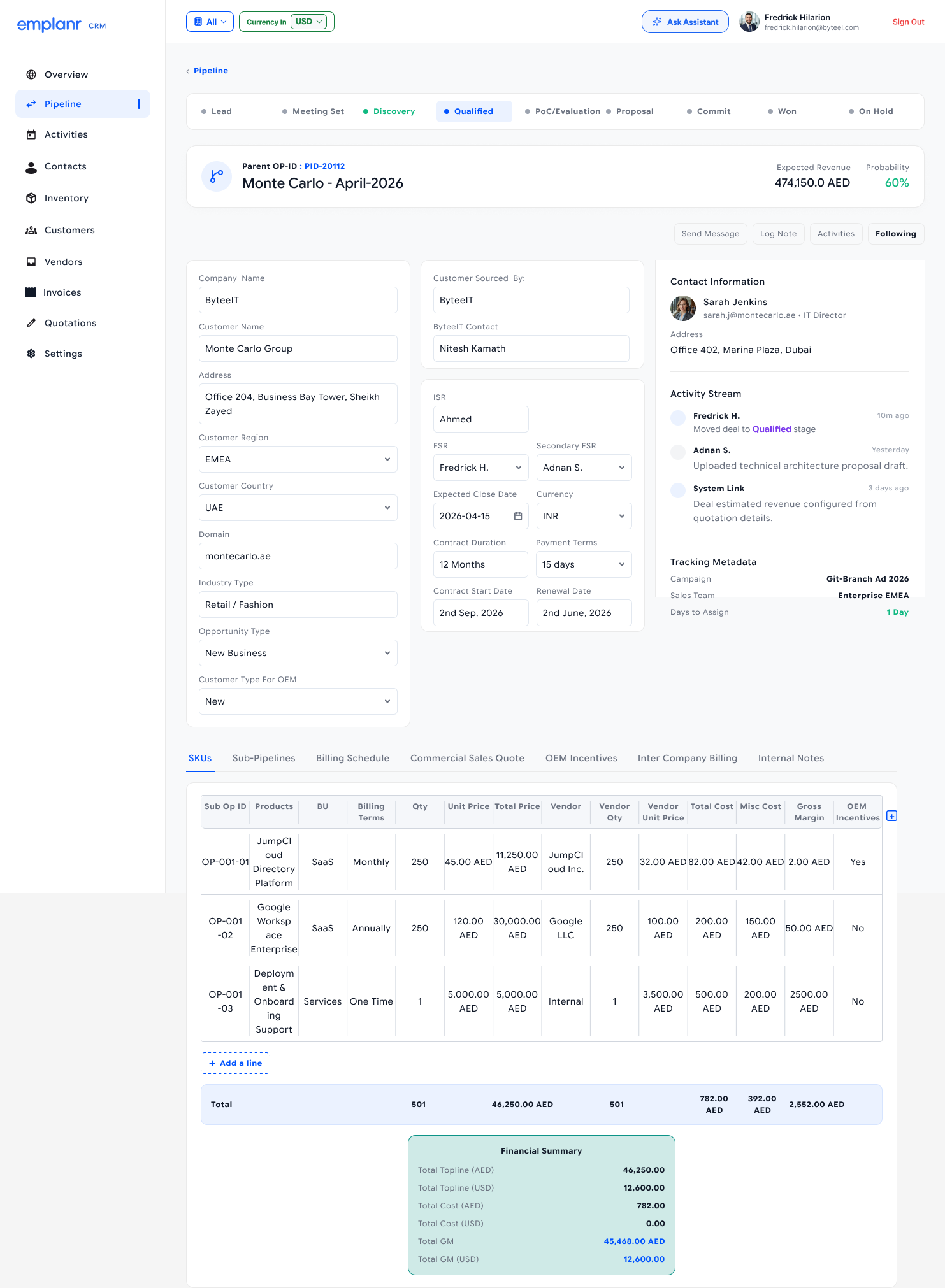
The opportunity detail combines customer information, sales ownership, dates, and activity with tabs for SKUs, sub-pipelines, billing, quotations, incentives, and notes.
Context before the next action.
The stage indicator and opportunity identity establish where the deal stands. Grouped fields then separate customer context from internal ownership, while activity remains visible alongside the record.
- 01Persistent deal context
Stage, identifier, expected revenue, and probability anchor the workspace.
- 02Detail by task
Tabs organize commercial data into focused destinations instead of presenting every table at once.
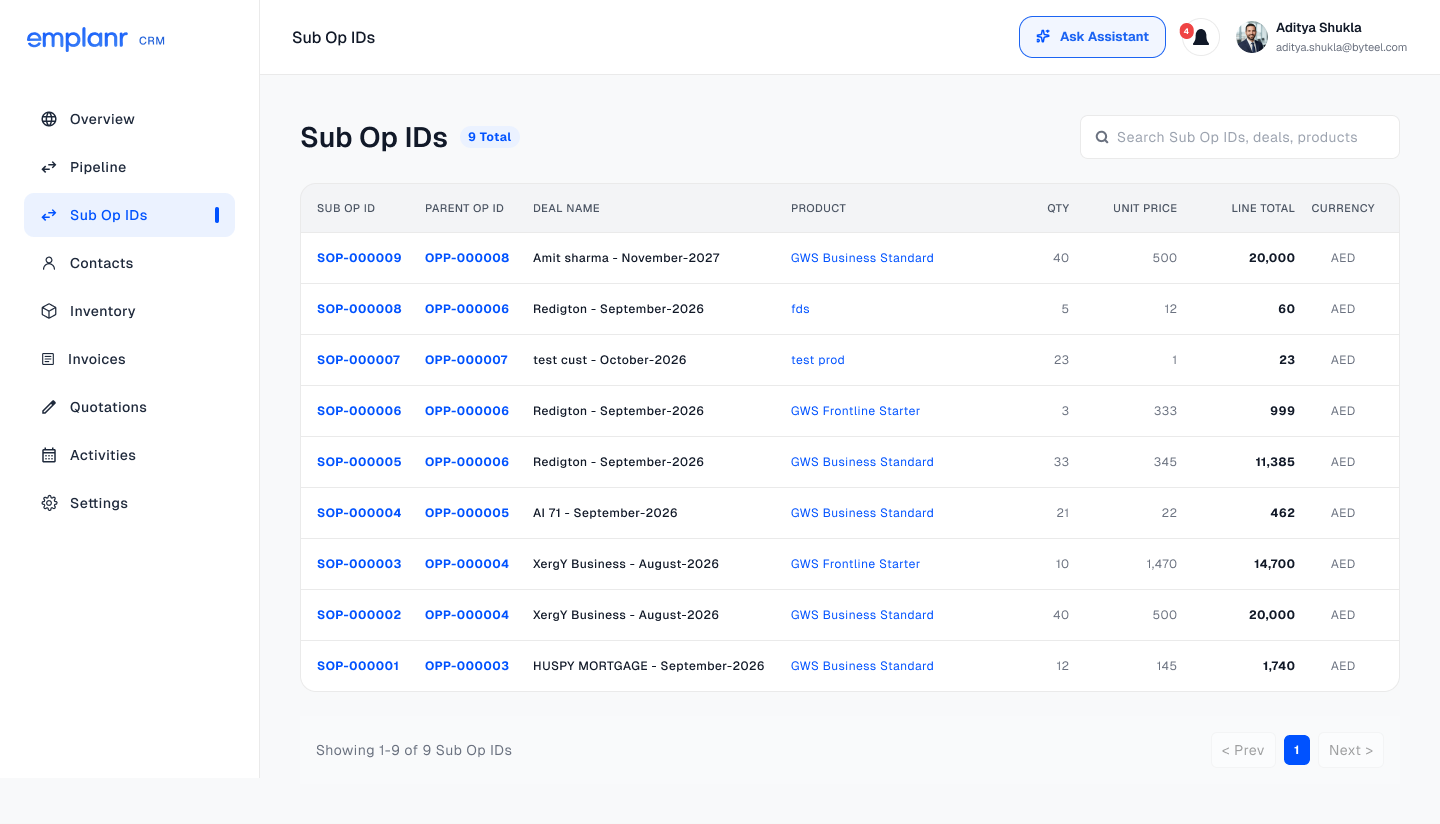
- 03Line-item traceability
The Sub Op IDs register connects each product line to its parent opportunity, quantity, unit price, and currency.
03 / Sales ownership
A handover is a decision.
Make the outcome explicit.
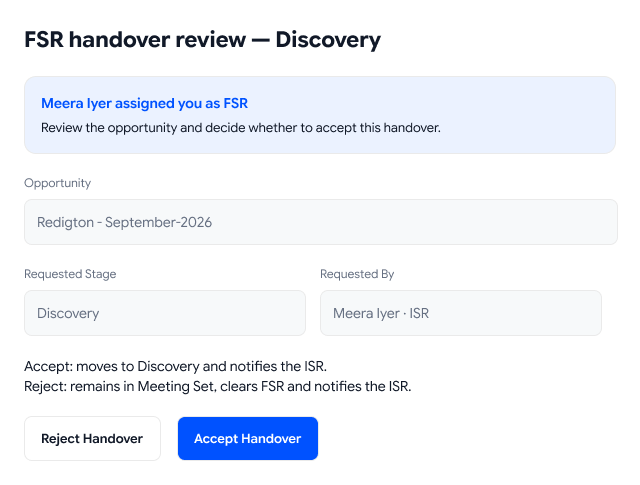
The pipeline walkthrough distinguishes a requested transition from an accepted handover. The receiving field sales representative (FSR) reviews the request from the inside sales representative (ISR).
Explain both paths before the click.
The review dialog identifies the opportunity, requested stage, and requester. It also explains the consequences: acceptance moves the opportunity to Discovery and notifies the ISR; rejection keeps it in Meeting Set, clears the FSR, and notifies the ISR.
04 / Versions & validation
Keep the revisions.
Identify the agreement.
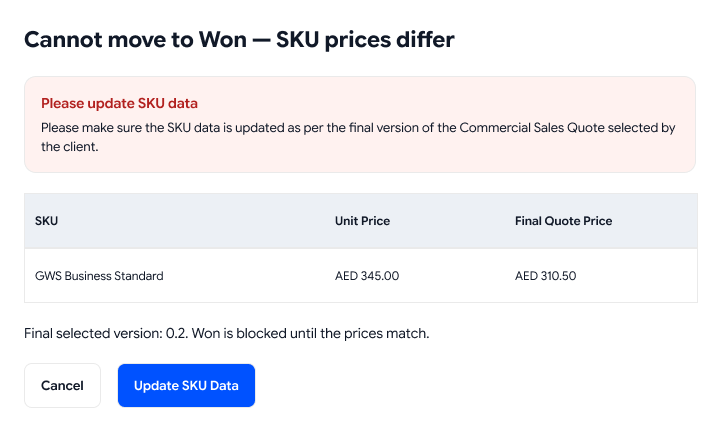
The Commercial Sales Quote view retains proposal history and asks which version the client selected. Before an opportunity moves to Won, the design checks that its SKU prices match that final proposal.
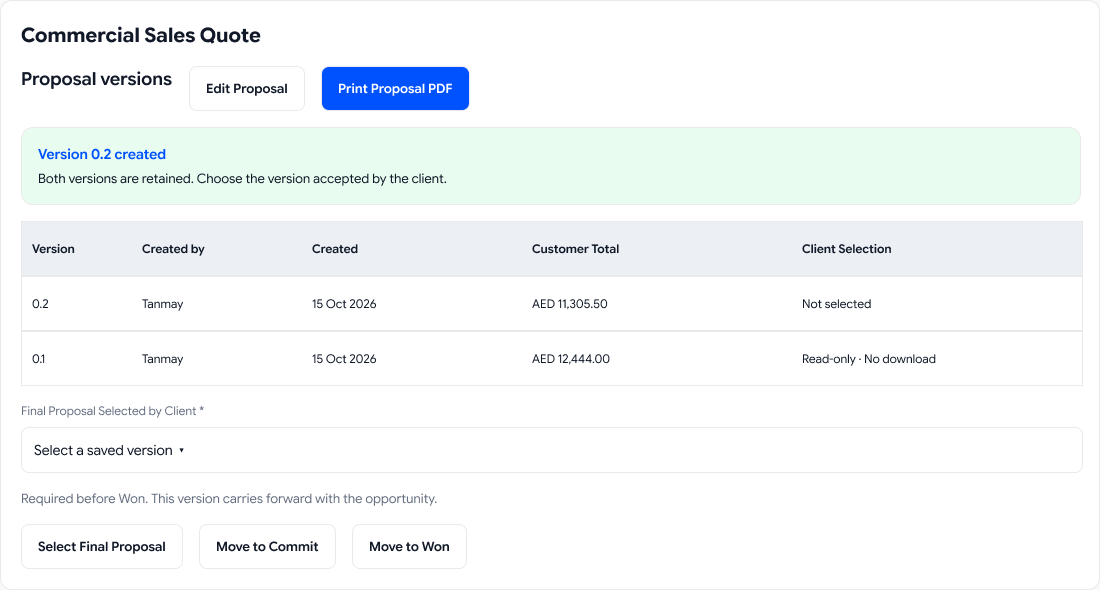
Latest is not the same as accepted.
The version table shows authorship, date, value, and client selection. An explicit final-version choice establishes which commercial terms should carry forward.
A useful block explains the correction.
The mismatch dialog names the affected SKU and shows the current and final quote prices side by side. “Update SKU Data” provides a direct next step.
What does the price check protect?
The design prevents a Won transition when the opportunity’s product prices differ from the selected proposal. It asks the user to reconcile the commercial records before proceeding.
What remains to be tested?
Check whether people can identify the accepted version, understand the mismatch, correct the right product line, and resume the transition without losing context.
How should these screens be interpreted?
These are documented interface states and workflow intentions from the supplied Figma file. They are not evidence that the production system enforces the rules.
05 / Sales to Finance
Connect the invoice
to the opportunity behind it.
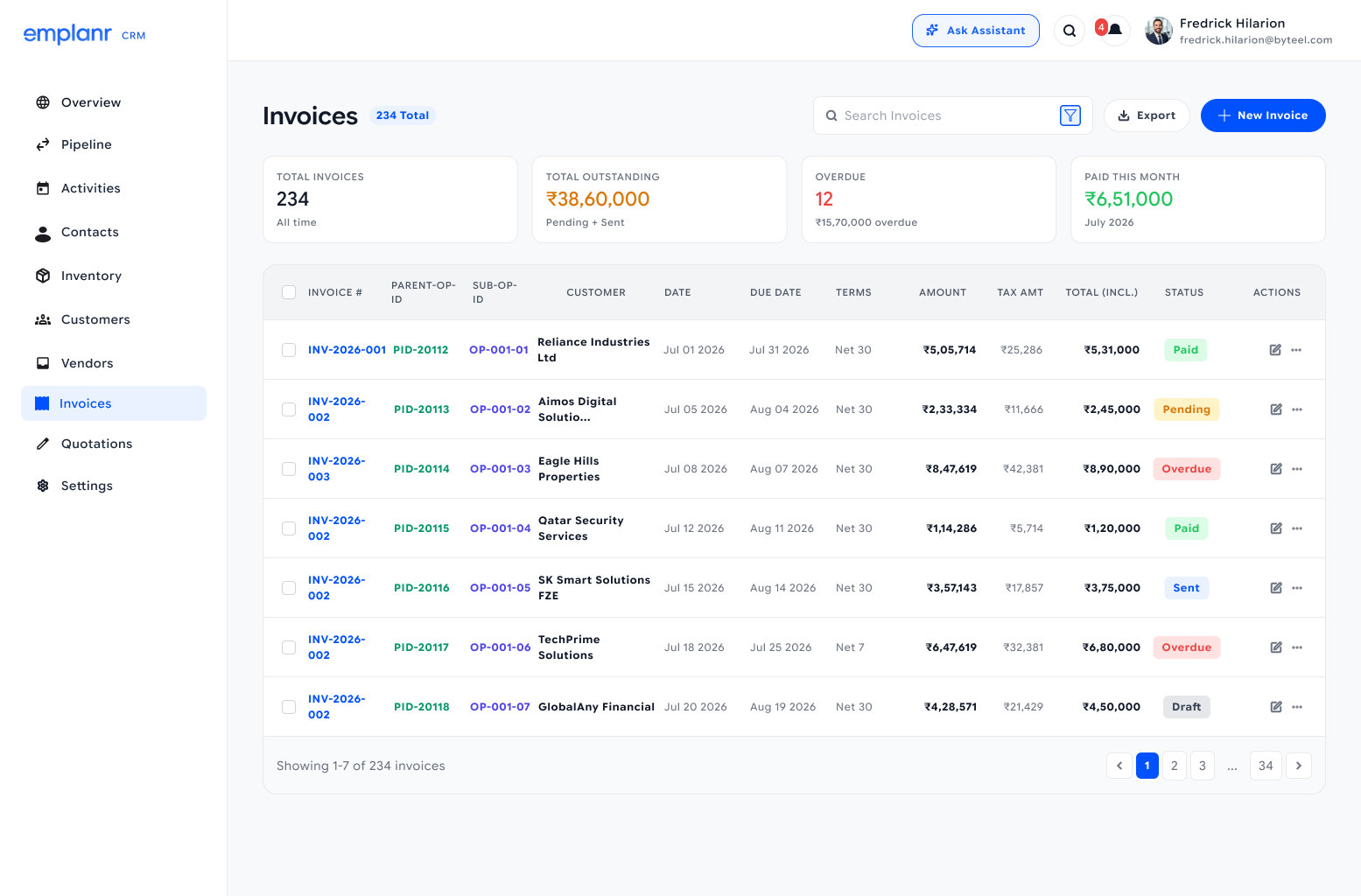
The invoice list includes parent and sub-opportunity identifiers alongside customers, dates, payment terms, amounts, and statuses. Those connections give Finance a route back to the commercial record.
Find
Search and filters sit beside invoice creation and export, supporting both lookup and operational work.
Distinguish
Paid, pending, sent, overdue, and draft states use text labels as well as color.
Trace
Parent and sub-opportunity references preserve the relationship between the sale and its billing records.
From an overview to the underlying records.
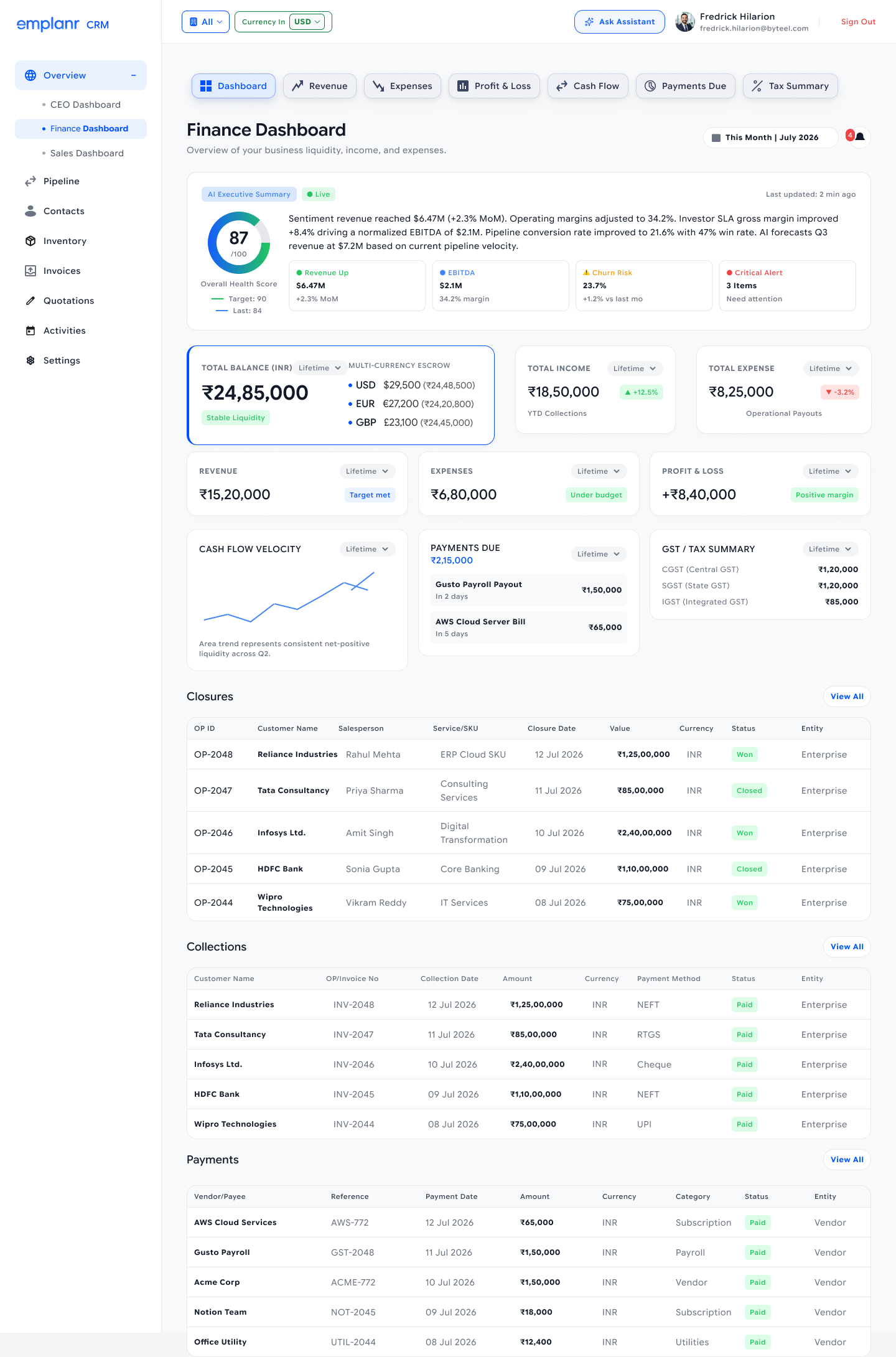
The Finance dashboard groups balances, income, expenses, cash flow, and payments due before detailed closure, collection, and payment tables. Company and currency controls provide context for interpreting the figures.
06 / Decisions & trade-offs
Balancing sales momentum.
Protecting deal integrity.
Fast-moving sales teams prioritize quick pipeline progression, while commercial operations requires verifiable terms and clean handoffs. These trade-offs keep deals moving without compromising auditability.
Pipeline handover
Explicit acceptance gating over automatic stage reassignment.
Receiving field reps must actively accept or decline an incoming opportunity with clear visibility into the resulting stage transition.
Adds a deliberate handoff check rather than instant re-assignment, but prevents deals from falling into unaccountable limbo between inside and field sales.
Commercial proposals
Explicit client-selected quote versioning over "always latest".
The version register preserves all historical quotes and requires users to explicitly designate the agreement the client signed.
Requires an intentional choice when multiple revisions exist, but stops outdated discounts or unapproved draft figures from silently propagating downstream.
Deal closure & billing
Hard pricing validation blockers over frictionless "Won" clicks.
A mismatch between line-item SKU prices and the final accepted quote halts the Won transition until reconciled via Update SKU Data.
Introduces friction during month-end sales closing, but eliminates painful post-sale invoicing disputes and contract reconciliation errors.
07 / Visual language
A consistent workspace.
Clearer decisions.
The CRM uses light surfaces, blue action emphasis, structured tables, and contextual dialogs. The case study preserves the portfolio’s existing typography; the product screens retain their original typography.
Navigation
A stable frame
Persistent navigation and selected states keep users oriented as they move between Pipeline, Sub Op IDs, Invoices, and Finance.
Information
Structure before decoration
Card groups, table headers, and tabs establish relationships within dense commercial data.
Feedback
State plus next step
Handover explanations and mismatch details connect status to the action available to the user.
08 / What to validate next
Clarity across roles.
Confidence at each transition.
The next step is to test whether sales and Finance users can follow the connections, understand the rules, and recover from exceptions without assistance.
Handover comprehension
Ask the receiving representative to explain what accepting and rejecting will change before making a decision.
Version selection
Observe users choosing the client-accepted proposal when multiple revisions have different values.
Mismatch recovery
Test whether users can locate the incorrect SKU price, correct it, and return to the Won transition.
Financial traceability
Ask Finance users to trace an invoice to its parent opportunity and product line, including a change of currency context.
This case study draws on the supplied CRM Figma designs, including the pipeline walkthrough. Amounts, percentages, names, and counts are screen content, not measured outcomes. User research results and production performance have not been supplied.
Emplanr CRM
Keep the deal moving.
Keep its context intact.
Connected records, explicit ownership, and reviewable transitions across the commercial workflow.
Explore the Figma file (opens in a new tab)