Emplanr HRMS / Enterprise product design
Complex people operations.
Clear paths forward.
Connecting everyday employee needs with the HR and Finance workflows behind them—from checking in to receiving a payslip.
01 / The design challenge
One product.
Different responsibilities.
Employees need quick answers and straightforward actions. HR needs complete records and clear exceptions. Finance needs reviewable calculations and explicit release controls. The design connects these perspectives through a common interface.
Employee
What do I need to do?
Check attendance, request time off, manage assigned equipment, and access released payslips.
HR
What needs my attention?
Prepare contracts, connect salary structures, track signatures, and resolve incomplete records.
Finance
What is ready to release?
Review payroll, record payment details, and distinguish approval from payslip publication.
02 / Employee self-service
Make everyday tasks
easy to find.
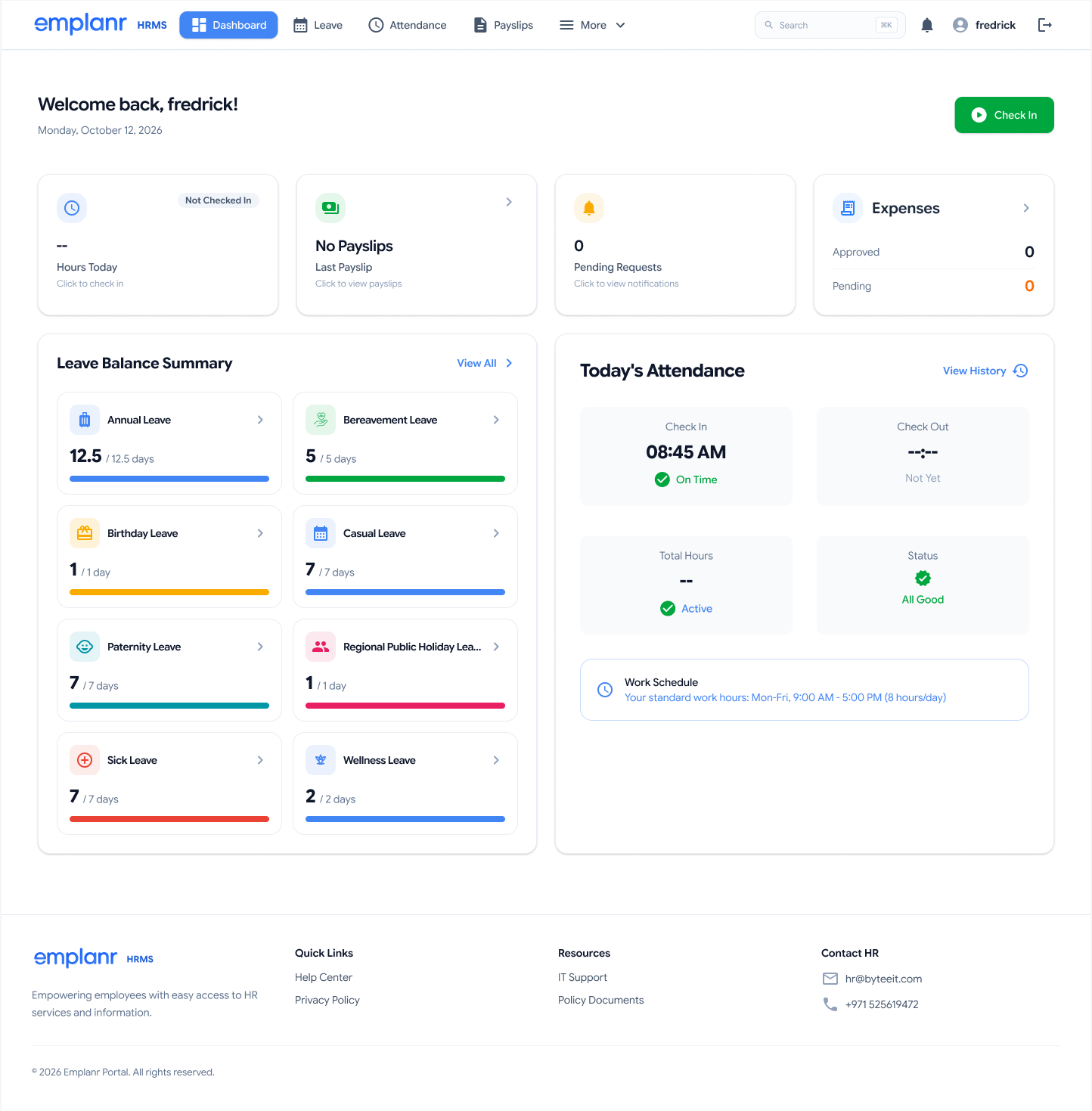
The dashboard brings attendance, leave balances, expenses, and payslip access into one starting point. Dedicated flows then narrow the interface to the task at hand.
A focused request, with context intact.
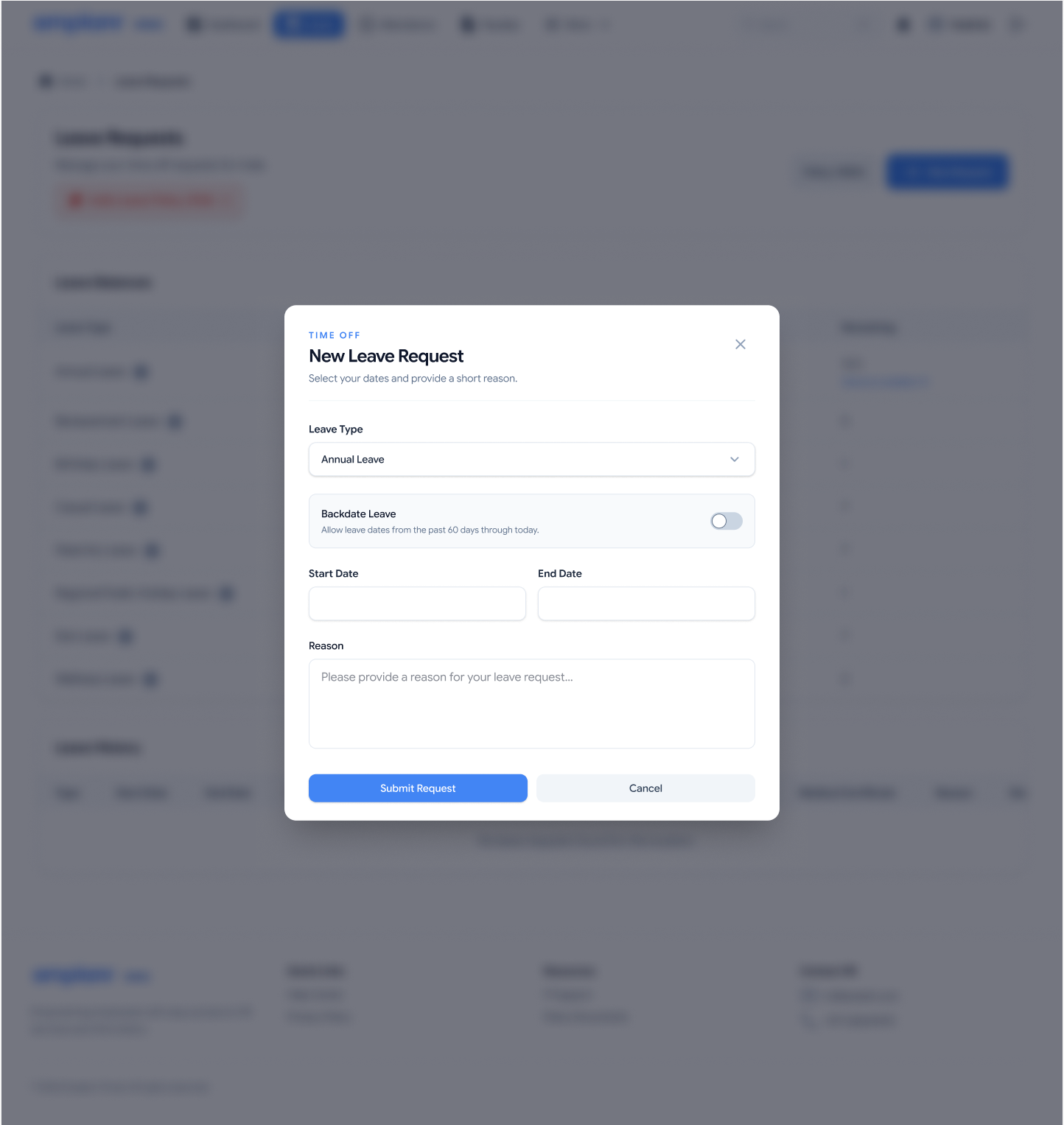
The leave request opens over the leave workspace. A single form collects the leave type, dates, and reason; the backdate option explains its available date window beside the control.
- 01Overview before action
Leave balances and daily attendance give employees context before they begin a request.
- 02Rules beside the decision
The backdate explanation sits with its switch, rather than relying on a separate policy page.
- 03A visible way out
Submit and cancel remain together, while the underlying workspace preserves the point of return.
03 / Equipment & exceptions
Track the equipment.
Surface the exception.
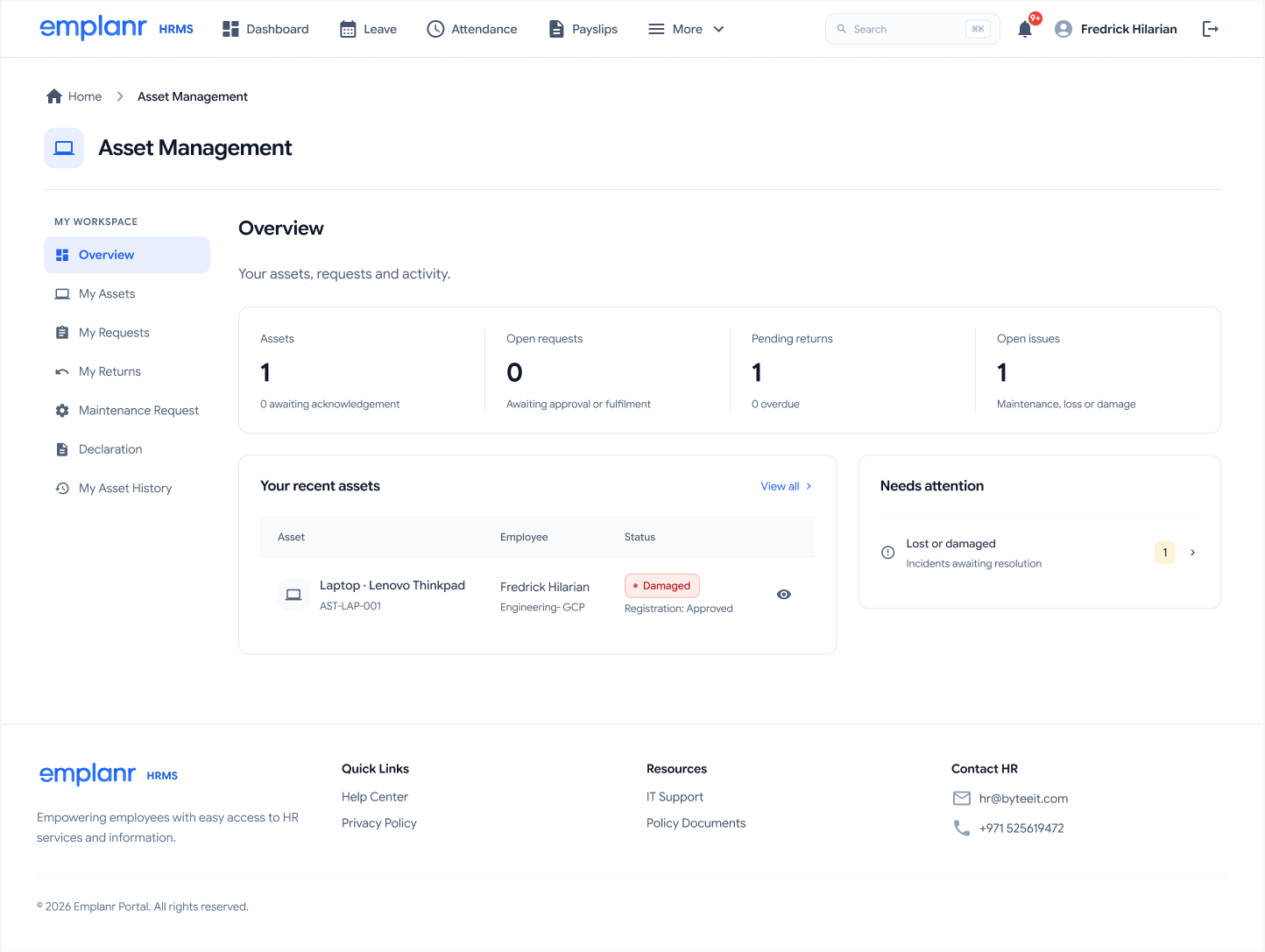
Asset management separates what someone owns from the work still in progress: requests, returns, maintenance, declarations, and history.
Orient
Summary counts distinguish assets, open requests, pending returns, and open issues.
Prioritize
“Needs attention” surfaces unresolved incidents alongside the recent asset list.
Follow through
Dedicated navigation gives requests, maintenance, and asset history their own destinations.
04 / Contracts & compensation
A connected agreement.
A deliberate handoff.
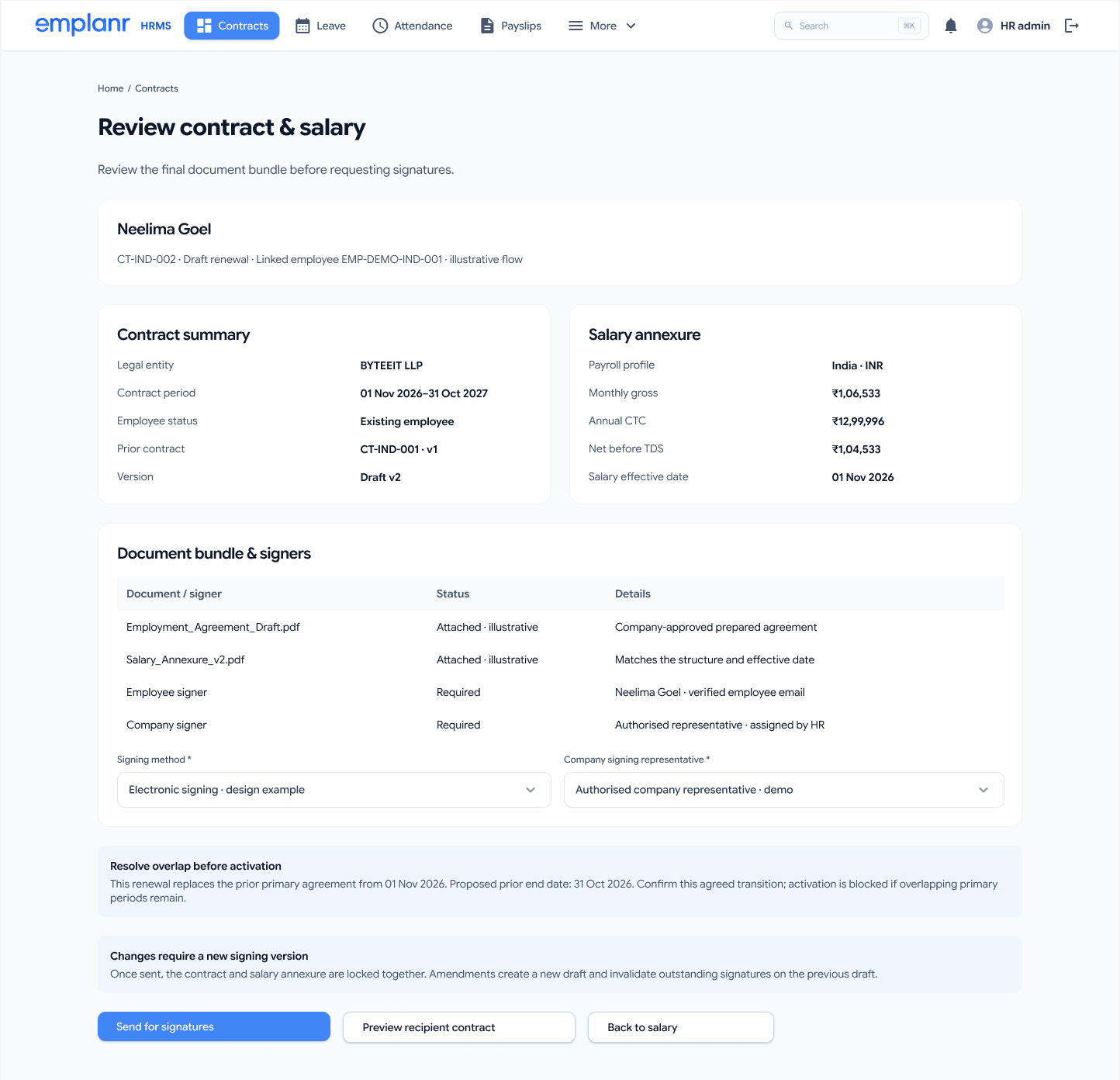
The contract flow brings employment details and the salary annexure into one review. Documents, signers, dates, and versions are visible before the agreement is sent.
Review the whole commitment.
Side-by-side summaries connect contract dates to compensation. The document bundle makes the required signers explicit, while notices explain overlapping periods and the effect of amendments.
- 01Keep related records together
The contract and salary annexure are presented as one document bundle for signing.
- 02Explain consequential changes
The design states that amendments create a new draft and invalidate outstanding signatures on the previous version.
- 03Separate signing from activation
Signature tracking and activation have distinct screens. A sent agreement is not treated as an active contract.
Why show an overlap warning before activation?
The review design flags overlapping primary contract periods and asks HR to confirm the transition date. This makes an important dependency visible before the new agreement takes effect.
How does the design handle regional salary differences?
The file contains separate India, UAE, Saudi-national, and non-Saudi salary paths. These are interface design examples; this case study does not claim their calculations are legally validated.
05 / From payroll to payslip
Approval is a step.
Release is another.
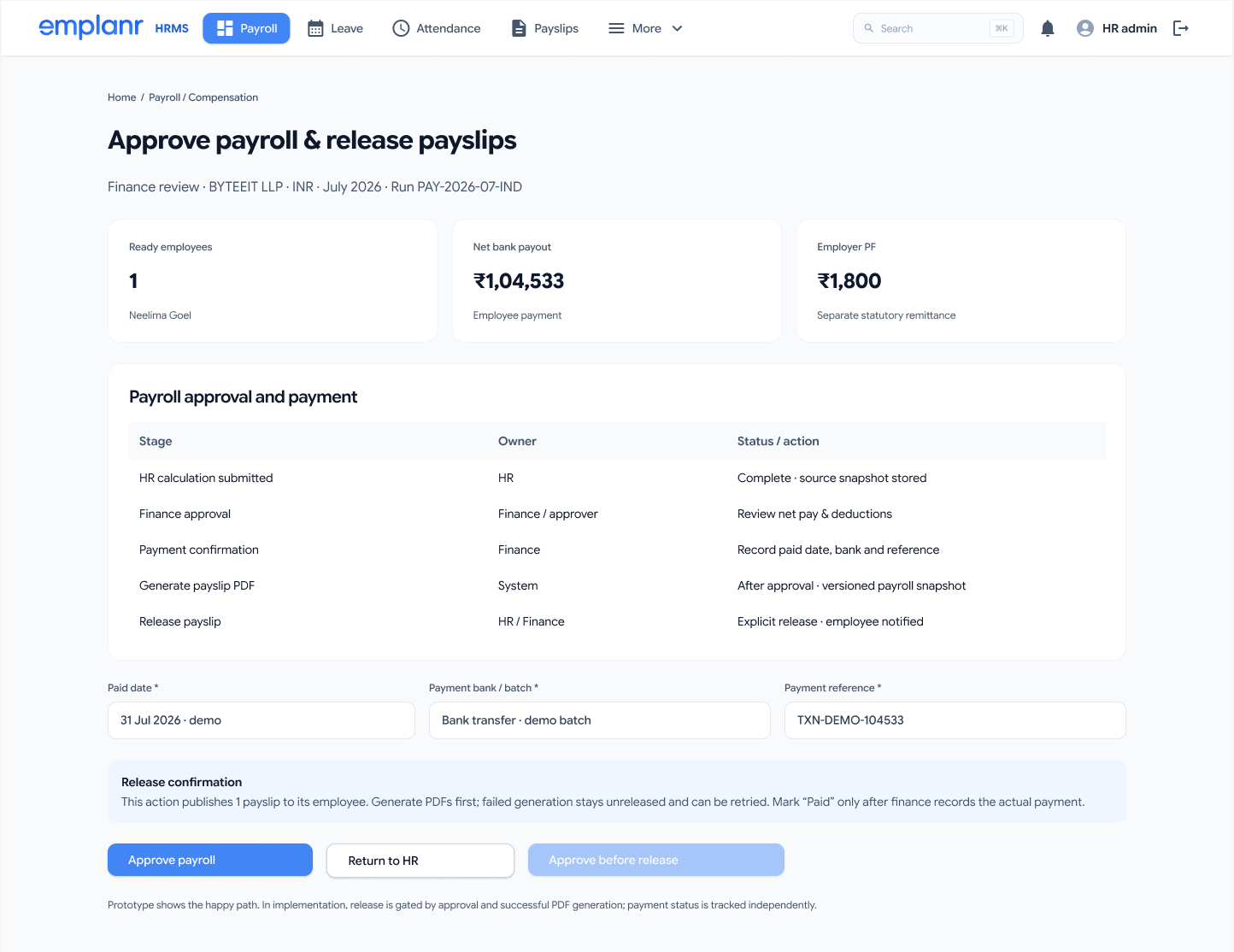
Payroll review, payment confirmation, PDF generation, and employee release have different owners and conditions. The Finance workspace makes that sequence explicit.
Review
The approval table connects each stage to its owner, including the HR submission and Finance review.
Confirm
Payment date, batch, and reference are recorded separately. The design distinguishes approval from actual payment.
Release
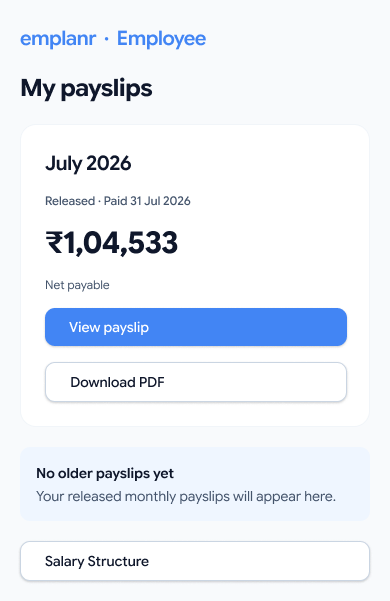
Employee access follows an explicit release action. The mobile view prioritizes net payable, status, viewing, and download.
06 / Decisions & trade-offs
Balancing speed.
Protecting accuracy.
Every workflow balances employee convenience against organizational risk and regulatory compliance. These trade-offs keep the product helpful without creating operational blind spots.
Employee self-service
Scoped backdating over unconstrained leave requests.
Employees can submit retrospective leave directly within the modal, but the date selection is strictly bound to policy-configured backdate windows.
Allows quick resolution for emergencies and sickness without opening up arbitrary retrospective edits that disrupt payroll accounting.
Contracts & compensation
Strict version invalidation over quick inline amends.
The employment agreement and salary annexure are combined into a single document bundle where any amendment forces a new version.
Requires re-initiating the signature chain even for small typo fixes, but ensures complete legal validity and eliminates conflicting salary terms.
Payroll operations
Multi-stage release gates over instant payslip publication.
HR submission, Finance approval, bank payment reference recording, and employee payslip release are four separate milestones.
Adds deliberate friction for administrators, but prevents irreversible salary discrepancies, tax computation errors, and employee panic.
07 / A reusable design language
Shared patterns.
Less to relearn.
The supplied design system defines navigation, buttons, inputs, status chips, filters, cards, tables, and dialogs. These patterns connect the employee workspace to the more detailed operational flows.
Consistency in the controls.
Repeated patterns make different tasks feel like parts of the same product.
- Navigation & selected statesA common shell establishes the current destination.
- Forms & dialogsInputs and primary actions follow a recognizable hierarchy.
- Tables & cardsSummaries support scanning; detailed rows support review.
Meaning in the hierarchy.
Light surfaces and blue action emphasis keep the product focused on information and next steps.
- Blue for actionsSelected navigation and primary buttons share an emphasis color.
- Status with contextChips pair color with words such as damaged, approved, and released.
- Portfolio typography preservedExisting serif headings and body text frame the story; original product typography remains inside the exhibits.
08 / What to validate next
Clarity at every handoff.
Confidence in the next step.
The design brings employee tasks and operational decisions into a coherent workflow. Validation should focus on whether people understand the status of their work and can act without unnecessary assistance.
Employee task completion
Observe employees requesting leave, finding an asset issue, and accessing a released payslip. Record completion, errors, and requests for help.
Contract comprehension
Ask HR to explain the current version, required signers, and activation conditions before sending an agreement.
Payroll state recognition
Check whether reviewers distinguish approved, paid, generated, and released—and can identify what blocks the next step.
Recovery & accessibility
Test failed PDF generation, incomplete records, keyboard use, zoom, and mobile payslip access before treating the flows as ready for release.
This case study is based on the supplied HRMS 2.0 Figma designs. Names, balances, and payroll figures are interface examples. Research results, production adoption, and measured business outcomes have not been supplied.
Emplanr HRMS
Make complex operations
understandable.
A shared interface for everyday needs, with explicit ownership and review at the moments that matter.
Explore the Figma file (opens in a new tab)